Photoshop
Remove background
Swap out your scene.
Use intuitive tools to make complex edits in a few steps. Replace a blah background with a whole new setting and give your images a custom look.
Combine images
Create something totally new.
With best-in-class design tools at your fingertips it’s simple to merge images. Make a composite with bits and pieces of multiple images to create the unexpected.
Transform images
Make instant edits.
Make amazing graphics and more. Use a full suite of one-of-a kind tools to customize text, color, and images to create something completely unique.
Explore Photoshop features.
Instantly expand images.
Click and drag beyond the borders of an image with the Crop tool, then use Generative Expand to fill the extended canvas with new content that blends with the existing image.
Edit images with generative AI.
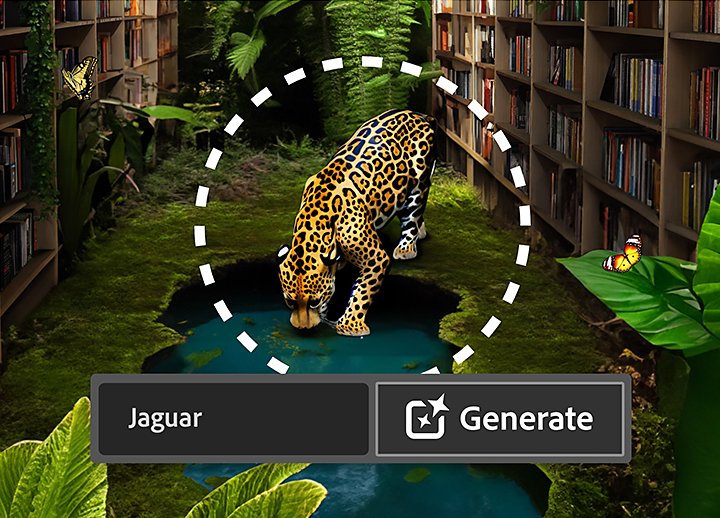
Make complex edits in a flash with Generative Fill. Use simple text prompts to add and remove content from images.
Crop an image.
Select part of an image with the Crop tool and remove everything outside the selected area, or pair it with Generative Expand to extend the image.
Combine images.
Create a composite of two or more images by placing them on their own independent, transparent layers.
Add text to images.
Incorporate words into your photos and images to create eye-catching designs.
Make imperfections vanish.
Click and drag the Spot Healing Brush tool over small objects or flaws in your image to remove them.
Edit images right in your browser.
Add, remove, or expand content in images online with Photoshop on the web. Upload and edit multiple file types, explore tutorials, and more.
Apply filters for a new look.
Use over 30 new Adjustment Presets to dramatically change images. Hover to preview, click to apply, then tweak the results to make it unique.
Make large objects disappear.
Brush over or circle around a large shape with the Remove tool to fill it with content that matches the background, creating seamless edits.
Edit with next-step suggestions.
Click on features right in the Contextual Task Bar, a floating menu that displays next tasks based on what you’re doing and expedites masking and generative AI workflows.
Add and edit gradients on-canvas.
Use live preview and on-canvas controls to perfect the color and blend before applying them to your images with the improved Gradient tool.
Get feedback in-app.
Send a link to your work with Share for Review so anyone can view it and leave comments in your files — no sign-in needed. Respond to feedback and send updates to the same link, all in-app.
MEMBERSHIP PLANS
Get Photoshop.
Start with just Photoshop or get Photoshop and 20+ other apps with the Creative Cloud All Apps plan.
Photoshop
The full version of Photoshop, plus Adobe Express Premium plan.

Create gorgeous images, rich graphics, and incredible art with Photoshop

Use thousands of free templates to make standout content with an Adobe Express Premium plan

Fonts, images, tutorials, and more

100GB cloud storage

500 monthly generative credits
Creative Cloud All Apps
The full version of Photoshop plus Adobe Express Premium plan and more than 20 apps.
Create gorgeous images, rich graphics, and incredible art with Photoshop

20+ photo, graphic design, and video apps
Use thousands of free templates to make standout content with an Adobe Express Premium plan
Fonts, images, tutorials, and more
100GB cloud storage
1,000 monthly generative credits
Creative Cloud All Apps for students and teachers
The full version of Photoshop plus Adobe Express Premium plan and more than 20 apps at a special price.
Create gorgeous images, rich graphics, and incredible art with Photoshop
20+ photo, graphic design, and video apps
Use thousands of free templates to make standout content with an Adobe Express Premium plan
Fonts, images, tutorials, and more
100GB cloud storage
1,000 monthly generative credits
Photoshop for teams
The full version of Photoshop, Adobe Express Premium plan, plus exclusive business features.
per license
Create gorgeous images, rich graphics, and incredible art with Photoshop
Use thousands of free templates to make standout content with an Adobe Express Premium plan
Fonts, images, tutorials, and more
100GB cloud storage
500 monthly generative credits

Exclusive business features
Creative Cloud All Apps for teams
The full version of Photoshop plus Adobe Express Premium plan, more than 20 apps for design, video, and exclusive business features.
per license
Create gorgeous images, rich graphics, and incredible art with Photoshop
20+ photo, graphic design, and video apps
Use thousands of free templates to make standout content with an Adobe Express Premium plan
Fonts, images, tutorials, and more
100GB cloud storage
1,000 monthly generative credits
Exclusive business features
Edit photos online with Adobe Photoshop.
Add, remove, or expand content in images right in your browser with Photoshop on the web. Included in every Photoshop plan.

Questions? We have answers.
Plans start at . Learn more about purchasing options on the Creative Cloud plans page.
Yes, you can use Photoshop to edit videos. Learn more about video editing in Photoshop.
Photoshop is only available as part of a Creative Cloud plan, which includes the latest features, updates, fonts, and more.
You can sign up for a free trial of Photoshop. Or create graphics, collages, flyers, videos, and animations for free with Adobe Express. For on-the-go creativity, you can install Photoshop Express on your smartphone for free.
There isn’t a free version of Photoshop on the web, however you can try out some of Photoshop’s most popular tools and uses online with the help of guided tutorials without creating an Adobe account. To upload and edit your own photos, you’ll have to sign up for a Photoshop plan or start a free trial.
Yes, you can use Photoshop on the iPad. Find out more here.
Yes, students and teachers save over 60% on the Creative Cloud All Apps plan. Find out more here.
Generative AI features like Generative Fill and Generative Expand are natively integrated into Photoshop, combining the power of AI with the precision of Photoshop, so you can create more with complete control. Add, expand, and remove content in images using features powered by Adobe Firefly, and then adjust them using the editing tools in Photoshop.
